Contact Us WhatsApp / Phone:
+86 138 7150 9802
Business Hours: 9:00 AM - 6:00 PM(GMT+8)

From Concept to Creation: How to Design Your Custom Cosmetic Box for Wholesale Production

You have a brilliant vision for your cosmetic packaging1, but the path from idea to a file ready for production seems complex and full of technical pitfalls. One small mistake feels like it could jeopardize the whole project.

Turning concept into creation is a clear, five-step process: build your foundation, master the dieline2, create impactful artwork, design for the material, and complete a final pre-press check. This structured approach ensures your vision is executed perfectly for wholesale production.

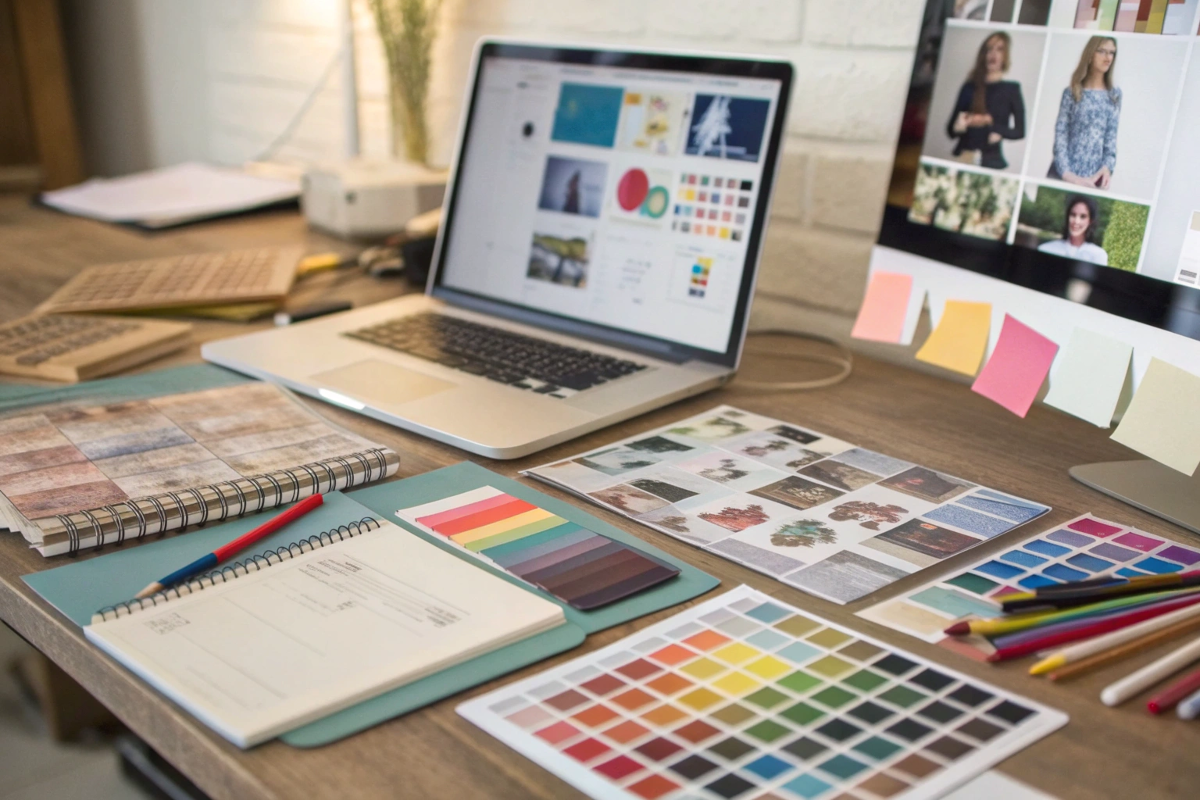
A designer's desk showing a mood board, material swatches, product samples, and a computer with design software.

As a brand founder or product developer, your creativity is the driving force behind your brand. Our role, as your manufacturing partner, is to provide the technical framework to bring that creativity to life flawlessly. We've guided hundreds of brands through this exact journey. Think of this guide as us sitting next to you at your design desk. We'll walk you through each stage, demystifying the technical requirements and sharing best practices so you can design with confidence. Let's build your perfect cosmetic box, together.

Step 1: How Do You Establish Your Design Foundation?

You're excited to jump into designing logos and patterns. But designing without a clear brief is like building a house without a foundation—it leads to endless revisions and a final product that doesn't truly connect.

Before opening any design software3, you must define three things: your core brand identity4, your target customer profile, and the exact physical specifications of your product. This is your project's unbreakable foundation.

A mood board showing brand colors and logos next to a product being precisely measured with digital calipers.

This initial step is the most strategic work you will do in the entire process. It's all about asking the right questions before you start designing. Getting this foundation right saves enormous amounts of time and money later on by preventing costly redesigns. It ensures that every single design choice you make, from color palette to material texture5, is purposeful and aligned with your business goals. It's the critical thinking that precedes the creative work, and it's something we always discuss with our partners before we even think about creating a dieline.

Defining Your Brand Identity

What does your brand stand for? Is it clean and minimalist, bold and luxurious, or earthy and organic? Your packaging is your brand's physical handshake, so it must communicate this personality instantly. Before you choose a single color, write down five words that describe your brand. Let's see how that translates to our specialty materials:

  • "Clean, Organic, Natural" might lead you to a box wrapped in natural linen or organic cotton.
  • "Modern, Sleek, Innovative" could point towards a handheld case in a smooth, recycled PU with a crystal-clear TPU window.
  • "Luxurious, Heritage, Timeless" is perfectly expressed by the authentic feel of a recycled leather box, lined with plush rPET velvet.

Understanding Your Target Customer

Who are you designing this for? The aesthetic that appeals to a Gen Z TikTok enthusiast is very different from what resonates with a 50-year-old luxury skincare aficionado. Think about their values. Do they prioritize shareable, "Instagrammable" unboxing experience6s? Or do they value understated elegance and long-lasting, reusable function? Your design must speak their language. A vibrant, colorful rPET satin pouch might be perfect for the first, while a subtly debossed vegan leather case is ideal for the second.

The Non-Negotiable: Product Specifications

This is where precision is everything. "It's about the size of a lipstick" is not enough information. We need exact measurements of your product(s), preferably taken with digital calipers, to the tenth of a millimeter. You need to provide the Length, Width, and Height. We also need to know the product's weight and fragility. This information determines not just the size of the box, but the design of any protective interior inserts we might create from die-cut rPET to hold your product securely in place.

Foundation Element Key Question to Answer Example Action
Brand Identity What are my brand's top 3 values? We are "Luxurious, Sustainable, Honest."
Target Customer What does my ideal customer value in packaging? They value reusability and a premium tactile feel.
Product Specs What are the exact L x W x H and weight? Product is 45.2mm x 45.2mm x 110.0mm; weighs 150g.

Step 2: How Do You Master the Blueprint for a Perfect Fit?

You have your design ideas, but how do you make sure your artwork will actually fit on the box when it's produced? Guessing the layout on a flat rectangle is a recipe for disaster.

You need a dieline. The dieline is the single most important technical tool in the packaging design process7. It is the flat, 2D blueprint of your box that a professional supplier like us provides.

A graphic showing a flat 2D dieline on the left and the folded 3D cosmetic box it creates on the right.

The dieline can seem intimidating, but it's actually your best friend. Think of it like a sewing pattern for clothing or an architect's blueprint for a building. It's a precise, technical drawing that shows exactly where every fold, cut, and glue tab on your box will be. Using the correct dieline is not optional; it is the only way to guarantee that your final, printed artwork will align perfectly when your box is assembled into its 3D form. We provide custom dielines for all our clients' projects, from simple boxes to complex handheld cases, ensuring a perfect foundation for your artwork.

What Exactly Is a Dieline?

When you open a dieline file from us in design software like Adobe Illustrator, you'll see a series of different colored or styled lines. Each line has a specific meaning for our production team:

  • Cut Lines (Solid Lines): These indicate where the machinery will physically cut the material. This is the outer boundary of your box.
  • Crease/Fold Lines (Dashed or Dotted Lines): These show where the material will be folded to create the edges and corners of your box.
  • Bleed Lines (Often a Red or Magenta Line outside the Cut Line): This is a safety margin. Your background colors and patterns should extend all the way to this line to avoid any unprinted white edges appearing on the final product if the cut is off by a fraction of a millimeter.
  • Safety Lines (Often a Green or Cyan Line inside the Cut Line): All your critical information, like logos and text, should stay inside this line to ensure it doesn't get accidentally cut off.

How to Get and Use Your Custom Dieline

The process is simple. You provide us with the precise interior dimensions from Step 1. Our technical design team then inputs this into our system and engineers the perfect structure for your chosen material, whether it's a rigid rPET box or a sewn vegan leather case. We then export this as a vector file (usually an Adobe Illustrator .ai or .eps file) and send it to you.

Once you have the file, the most important rule is this: Place the dieline on its own locked layer in your design software. Your artwork should be created on separate layers above the dieline layer. This way, you can see the guidelines as you design, but they won't get accidentally mixed in with your final artwork.

Step 3: What are the Best Practices for Creating Visual Impact?

You have your dieline, a blank canvas. Now, what do you do with it? Just placing your logo randomly can look amateurish, and forgetting key information can get you into legal trouble.

Think of your box as a tiny storefront with different walls. Use a clear visual hierarchy8, place branding strategically, and always designate a specific, unobtrusive panel for mandatory regulatory information.

A cosmetic box design in Adobe Illustrator, showing proper placement of the logo, brand patterns, and a dedicated block for ingredients text.

This is the stage where your brand's personality truly comes to life. Effective graphic design on packaging is a careful balance of art, branding, and legal compliance. A well-designed box guides the customer's eye, tells a story, and provides all the necessary information in a clear, logical way. It's important to think about the box in 3D, even while you are designing in 2D. Imagine how your customer will pick it up, turn it around, and open it. Each panel serves a different purpose.

The Hierarchy of Panels

Not all panels are created equal. You need to assign a job to each surface of your box.

  • The "Hero" Panel (Front): This is your billboard. It should be clean, impactful, and instantly communicate what your brand and product are. This is almost always where your logo and the product name will live.
  • The Information Panels (Back/Bottom): This is where the details go. Think of this as the "fine print" section. It’s the perfect place for regulatory information9 like ingredient lists, net weight, company address, and disposal symbols.
  • The Storytelling Panels (Sides/Top): These are your supporting actors. Use these panels for secondary branding elements, like a subtle pattern, your brand tagline, or key product benefits ("Cruelty-Free," "Made with Recycled Materials").

Branding, Artwork, and the Unboxing Reveal

Consistency is key. Use your established brand colors and fonts throughout the design. When placing patterns or imagery, remember to extend them all the way to the bleed line on your dieline. Think about the unboxing experience as well. What does the customer see when they first open the lid? Designing a printed pattern or a message on the inside of the box can create a delightful and memorable moment of surprise.

The Non-Negotiable: Regulatory Information

For cosmetic products, this is not optional. Depending on your region (e.g., FDA in the US, CPNP in the EU), you are required to list certain information. This often includes:

  • An ingredient list (INCI)
  • Net weight or volume
  • Company name and address
  • Country of origin
  • Period-after-opening (PAO) symbol
  • Any necessary warning statements

We always advise our clients to consult with a regulatory expert to ensure their text is compliant. From a design perspective, your job is to allocate a clear, legible space for this information, usually on the bottom or back of the box.

Step 4: How Do You Design for the Sense of Touch?

Your design looks stunning on your high-resolution computer screen. But will that intricate, fine-lined pattern actually work on a textured natural linen fabric? Will your logo look good embossed into vegan leather?

You must design with your final material in mind. A design that works on a smooth surface may fail on a textured one. This step is about bridging the gap between your digital file and the physical reality of the final product.

A side-by-side comparison. Left: A complex design on screen. Right: The same design simplified for embossing on a textured vegan leather.

This step is where our expertise as a specialized manufacturer becomes invaluable. Because we work with these innovative materials every day, we understand their unique properties and how they interact with different design techniques. A great design on screen can become a messy failure in production if the material wasn't considered. The key is to think about the material's texture and how different finishing processes like foil stamping10 or embossing11 will translate.

How Material Texture Affects Your Artwork

The texture of your chosen material will dramatically impact how your printed artwork appears.

  • Smooth Surfaces (rPET Satin, TPU Windows, Smooth Recycled PU): These materials are like a blank canvas. They are excellent for printing very fine details, small text, and intricate patterns with crisp, sharp lines.
  • Textured Surfaces (Natural Linen, Coarse-Grained Vegan Leather, Recycled Leather): These materials have their own inherent texture. That texture adds a beautiful, tactile quality, but it can also interfere with very fine details. For these surfaces, it's best to use bolder fonts, simpler logos, and less intricate patterns. The texture of the material becomes part of the design itself.

How Finishes Change Your Design Approach

Finishes like foil stamping and embossing are not printing processes; they are physical processes. This requires a different design mindset.

  • For Foil Stamping: You need to provide your design as a solid vector shape. Photographic gradients or pixel-based images cannot be turned into a foil die. Bold lines and shapes produce the best, most impactful results.
  • For Embossing/Debossing: Similar to foil stamping, this requires bold vector shapes. Extremely thin lines and tiny text may not be deep enough to register clearly, especially on a softer material like rPET velvet. We can always advise you on the minimum line thickness we recommend for a given material.

The absolute best way to check your work? Prototyping. Seeing and feeling a physical sample is the only way to be 100% sure that your design, material, and finishes all work together in harmony. This is a mandatory checkpoint in our process for this very reason.

Step 5: What's on Your Final Pre-Press Handoff Checklist?

You've triple-checked your design. It's approved. You're ready to hit "send." But sending the wrong file type or forgetting a simple technical step can cause production to grind to a halt, leading to costly delays.

Use a pre-press checklist12 before sending your files. This final technical check ensures your file is perfectly prepared for our production workflow, preventing common errors that cause delays. This is how you hand off your project with confidence.

A checklist graphic with checkmarks next to items like "Fonts Outlined," "CMYK Mode," and "Bleed Included."

This final step is your last line of defense against preventable production problems. A "print-ready" file is one that our pre-press team can immediately process without having to email you with questions or requests for changes. Taking five minutes to run through this checklist can save you days of back-and-forth communication. To make it easy, we tell all our partners to use Adobe Illustrator's "Package" feature13, which automatically gathers all your fonts, links, and a report into one neat folder.

Your Essential Pre-Press Checklist:

  • [ ✓ ] Use the Correct File Format: Save your final file as a vector-based file. A packaged Adobe Illustrator (.ai) file is best, but a high-resolution PDF is also acceptable. Do not send JPEGs, PNGs, or Word documents.
  • [ ✓ ] Convert All Text to Outlines14: Select all text in your document and choose Type > Create Outlines. This turns the text into vector shapes, so we don't need to have your specific brand font installed on our systems to open the file correctly.
  • [ ✓ ] Embed All Linked Images: If your design includes any images (though less common for luxury boxes), make sure they are embedded directly into the Illustrator file, not just linked. This prevents "missing image" errors.
  • [ ✓ ] Use CMYK Color Mode15: Your screen displays color in RGB (Red, Green, Blue). Professional printing presses use CMYK (Cyan, Magenta, Yellow, Black). Designing in CMYK mode from the start ensures the colors you see on screen are closer to the final printed colors.
  • [ ✓ ] Ensure Artwork Extends to the Bleed Line16: Double-check that all background colors and patterns reach the outer bleed line on the dieline.
  • [ ✓ ] Keep Your Dieline on a Separate, Non-Printing Layer: Make sure the dieline layer is clearly labeled and set to not print. We only need it as a guide.

By following this checklist, you are handing off a file that is professional, complete, and ready for production. It signals that you are a detail-oriented partner and allows us to move your project into the prototyping and production phase immediately.

Designing custom packaging is a journey from strategic foundation to technical precision. Following these five steps ensures your creative vision becomes a beautiful, functional, and production-ready reality for your brand.


  1. Explore this resource to understand essential strategies for creating effective cosmetic packaging that stands out.

  2. Learn about dielines and how they ensure your packaging design fits perfectly during production.

  3. Find out which design software is most effective for creating packaging designs.

  4. Discover methods to articulate your brand identity, crucial for impactful packaging design.

  5. Understand how different material textures influence your packaging design choices.

  6. Discover tips for creating a memorable unboxing experience that delights customers.

  7. Get a detailed overview of the packaging design process to streamline your project.

  8. Explore the concept of visual hierarchy to enhance the effectiveness of your packaging design.

  9. Ensure compliance by learning about the necessary regulatory information for cosmetic products.

  10. Learn about foil stamping and how it can enhance the visual appeal of your packaging.

  11. Explore the embossing process and its impact on the tactile quality of your packaging.

  12. Ensure a smooth production process by following a comprehensive pre-press checklist.

  13. Explore this link to understand how the "Package" feature can streamline your design process and ensure print readiness.

  14. Learn why converting text to outlines is crucial for avoiding font issues in printing and ensuring your design looks perfect.

  15. Discover the importance of using CMYK for print designs to achieve accurate color representation in your final product.

  16. Find out how extending artwork to the bleed line prevents unwanted white edges and ensures a professional finish.

Related posts

Let's Create Your Perfect Packaging

eco-friendly-cosmetic-bag-manufacturer
We reply within 24 hours. All submitted information is used solely for quotation purposes and remains confidential.
CONTACT INFO
Rapid prototyping in just 7–10 days. Sample costs are fully refundable upon bulk order.